
Tuck
A downloadable tool for Windows and Linux
Tuck is a free video editor for Windows and Linux. Trim recordings, edit audio, and make clips small enough to share.
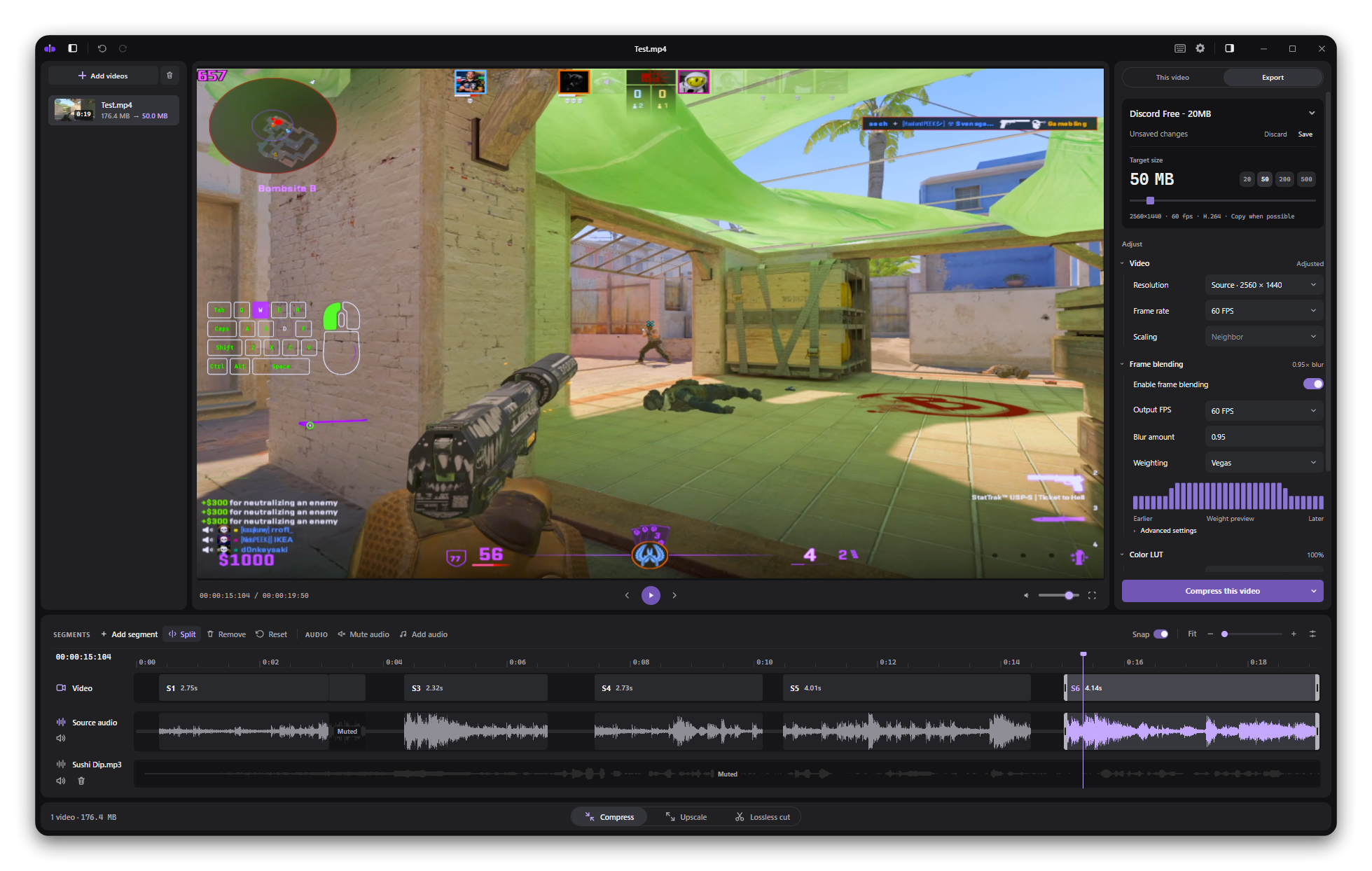
What you can do
- Trim and cut. Split recordings into segments and remove unwanted parts. Use lossless cutting to keep the original video quality without re-encoding.
- Edit audio. Adjust game and microphone volume separately when your recording has separate tracks. Mute unwanted parts or add music.
- Crop and resize. Crop, rotate or flip the picture, and choose an output resolution.
- Adjust the look. Apply color LUTs and frame blending.
- Compress and upscale. Export to a file-size limit or a higher resolution.
- Queue exports. Process several videos and save your settings as reusable profiles.
Windows and Linux
Tuck runs on Windows 10 and 11, and x86-64 Linux. Supported NVIDIA and AMD hardware encoding is available on Windows. Linux currently uses software encoding.
Videos are processed on your computer. FFmpeg and ffprobe are included.
Free and open source
Tuck is available under the GNU GPL v3.0 license. Donations are optional and help me keep working on it.
Download
Click download now to get access to the following files:
Leave a comment
Log in with itch.io to leave a comment.